

There’s a particular kind of frustration reserved for tools that used to work perfectly. Not broken software you’ve never trusted, but something you rely on daily that suddenly, without warning, starts misbehaving. That’s what happened to me on April 21, 2026, when OpenClaw — my AI assistant setup that I use for everything from content publishing to WhatsApp automation — started behaving strangely.
Every time I posted a comment or sent a message, it would appear on screen, vanish for 10–12 seconds, flash back, and then finally produce a response. It was jarring and unusable. Worse, I had no idea why. It had never happened before. Nothing had changed — or so I thought.
This is the story of how a silent, well-intentioned cron job created a self-reinforcing death spiral over three weeks, hit a tipping point overnight, and brought my gateway to its knees. And how I diagnosed and fixed it completely in under 35 minutes.
What Is OpenClaw?
For those unfamiliar, OpenClaw is a self-hosted AI assistant platform — think of it as a personal AI agent that runs on your own machine, connects to services like WhatsApp, Discord, and Tailscale, and can be automated with cron jobs, custom agents, and plugins. It’s powerful precisely because it’s flexible. That flexibility, it turns out, is also what bit me.
The Symptoms
Starting April 21, the pattern was consistent and reproducible:
Post a message → it appears briefly → disappears → reappears 10–12 seconds later → response arrives
Frequent 499 and 408 status errors in logs
The gateway process visibly starting and stopping
I asked OpenClaw itself what was happening and got a reasonable first-pass answer: latency and buffering in the gateway or message queue. The 10–12 second delay suggested messages were being held and then flushed. Combined with frequent disconnect events, it pointed to a systemic slowdown. OpenClaw spawned its internal Sentinel diagnostic subagent to investigate.
While waiting on Sentinel’s report, I did what any reasonable person does: I started Googling. I found that the symptoms matched several known OpenClaw issues — gateway restart loops, session store bloat, and version split artifacts from having two simultaneous installations. The picture was murky but pointed in a consistent direction.
The Diagnostic Report
Sentinel came back with an 18,000-character diagnostic report covering every layer of the system. What it found was worse — and more interesting — than a simple misconfiguration. Here’s what the report showed at the time of investigation:
Gateway CPU: 121% rising to 186% during the investigation window (and still climbing)
Gateway memory: 550–648MB RSS (elevated but not the bottleneck)
Active sessions: 316 total, with 215 in the main agent alone
Main agent session store: 79MB across 215 JSONL files
sessions.list latency: 700–800ms per call (normal: under 50ms)
chat.history latency: 5,789ms to 16,891ms per call (normal: under 2 seconds)
WhatsApp disconnect events on April 21: 158 occurrences
Subagent cleanup failures: 547 per day
The CPU was not just high — it was actively rising during the eight minutes Sentinel was running. This wasn’t a steady-state problem. It was a compounding one.
The Root Cause: A Cron Job That Became the Problem It Was Solving
The primary culprit was something I had completely forgotten about: a cron job called “WhatsApp Loop Recovery” that I had set up on April 3.
The job’s logic made sense at the time. WhatsApp Web connections in OpenClaw occasionally drop with 499 errors. The cron job would tail the gateway error log every 28 minutes, check for recent 499s, and if found, restart the gateway and report the WhatsApp status. Simple enough.
The problem was in the implementation details:
It used sessionTarget: “isolated” — meaning each run spawned a brand new isolated main-agent session rather than reusing an existing one
It set delivery.mode: “none” — results were silently discarded, never surfaced anywhere
Sessions were never cleaned up — due to a separate subagent registry bug, orphaned sessions accumulated indefinitely
It ran every 28 minutes, every day, for three weeks — generating 223 recorded runs, each leaving behind a session file
By April 22, the main agent session store held 215 JSONL files averaging 360KB each — 79MB of data that the gateway had to scan on disk every single time a client connected or reconnected.
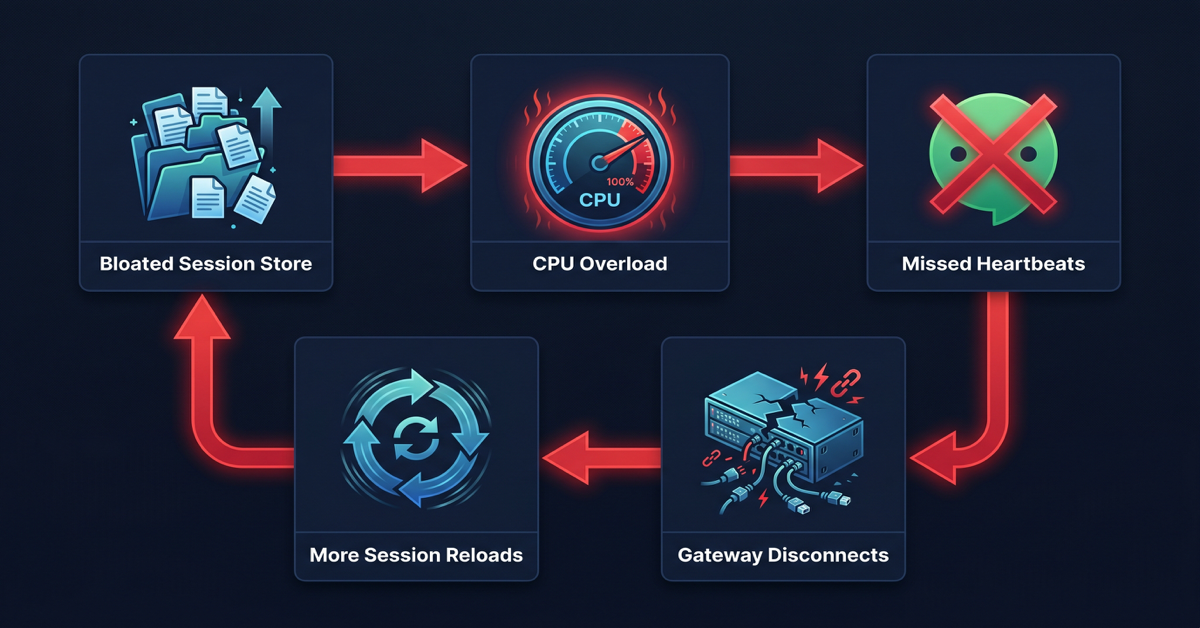
Here’s the mechanism that turned this into a crisis: on every WhatsApp disconnect, the gateway performs a full session store reload. With a 79MB store, that reload took between 5 and 17 seconds. During that 5–17 second window, the gateway’s Node.js event loop was saturated — unable to process heartbeats, respond to messages, or handle any other operations.
Missed heartbeats caused WhatsApp to time out after 30 minutes and disconnect again. Each disconnect triggered another full reload. Each reload caused more missed heartbeats. The cycle accelerated.
Sentinel identified the pattern precisely: slow chat.history calls spiked on a 57-minute cycle throughout April 21 — exactly matching the WhatsApp reconnect interval (30-minute heartbeat timeout plus reconnect overhead).
April 21 was simply the day the accumulated session volume finally exceeded the gateway’s single-threaded headroom. The cron job had been quietly building toward this for three weeks.
The Supporting Cast of Problems
The session store wasn’t the only issue. Sentinel found six additional problems contributing to the situation:
Version split. I had two OpenClaw installations: the CLI at /usr/local/bin running 2026.3.23-2, and the gateway binary via nvm running 2026.4.12. These versions used different file naming conventions for the subagent registry module. The nvm version expected subagent-registry.runtime.js which didn’t exist in its dist package — causing 547 subagent cleanup failures per day, each generating a JavaScript stack trace in the event loop and contributing to CPU burn.
Invalid config key. My openclaw.json contained an unrecognized agents.defaults.imageGeneration key from a previous experiment. This caused OpenClaw to run in degraded “best-effort” config mode on every startup, adding validation overhead and preventing proper initialization.
Tailscale Serve broken. The gateway was configured to expose itself via Tailscale HTTPS for remote companion app access, but the serve setup was silently failing on every gateway start. My iOS client on mobile networks couldn’t connect at all.
Discord integration failing. My Discord bot had been throwing code 4014 “missing privileged gateway intents” errors since March 25. I don’t actually use the Discord integration — I had connected it during initial setup and never removed it. It was sitting there, attempting reconnections and generating log noise for nearly a month.
AGENTS.md over context limit. My workspace bootstrap file was 20,702 characters — 702 over the 20,000-character limit. Every cron session was silently truncating the injected context, potentially causing agents to miss instructions in the tail section.
Runaway cron feedback. The WhatsApp Loop Recovery job was itself triggering on the very 499 errors it was causing — creating a secondary feedback loop where the “fix” was amplifying the problem.
The Fix: 34 Minutes, Eight Steps
Once the diagnostic was clear, the remediation was methodical. Here’s exactly what was done and in what order:
tailscale serve --bg --yes 18789
One command. Tailscale confirmed the proxy was running at https://davids-imac.tailb9bb03.ts.net/. Remote access restored immediately.
12:36 PM — Discord disabled.
bash
openclaw config set channels.discord.enabled false
openclaw gateway restart
Since I'm not using Discord at all, disabling it entirely was cleaner than fixing the intents configuration. The 4014 errors stopped immediately.
12:40 PM — WhatsApp Loop Recovery cron disabled.
bash
openclaw cron disable a999d8c4-43f6-402a-ad7f-9fa6af4830cb
This was the most important single action — stopping the session accumulation at its source. No more new sessions every 28 minutes.
12:40 PM — Session store pruned.
bash
find ~/.openclaw/agents/main/sessions/ -name "*.deleted*" -delete
find ~/.openclaw/agents/main/sessions/ -name "*.jsonl" -mtime +14 -delete
openclaw gateway restart
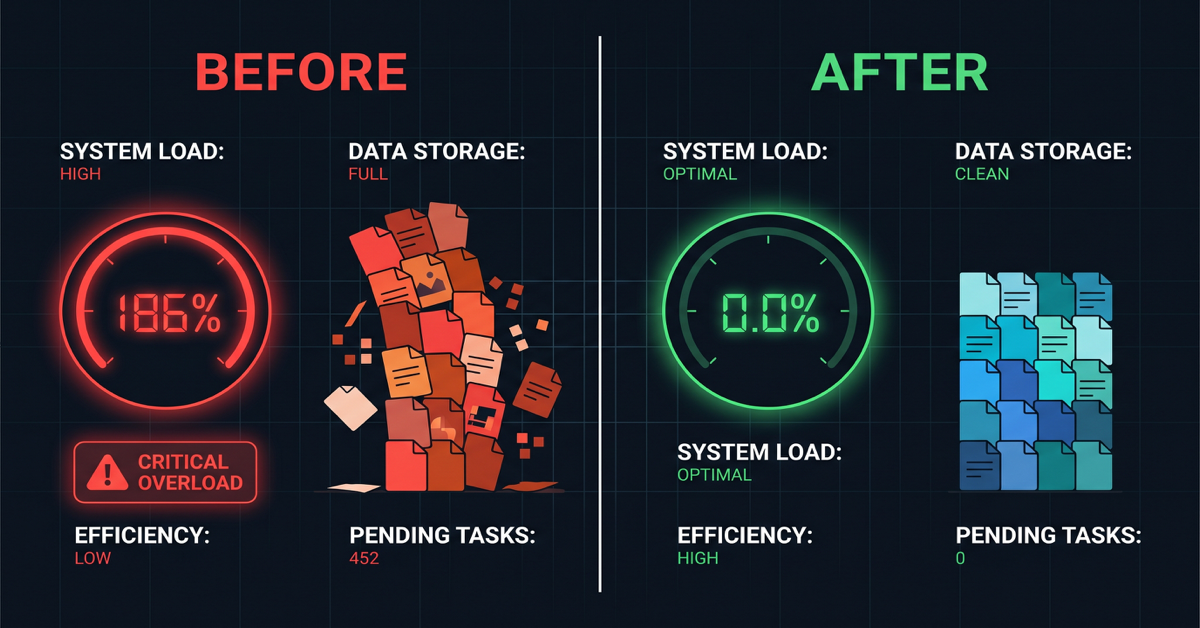
The first pass removed marked-deleted files (only 9). The second pass removed anything older than 14 days, targeting the cron-spawned sessions from early April. Sessions dropped from 215 to 73. CPU dropped from 186% to 0.3%.
12:42 PM — Verified recovery.
bash
ps aux | grep openclaw-gateway | grep -v grep | awk '{print $3}'
Output: 0.3. The gateway went from pegged-and-rising to essentially idle. The session prune was the fix.
12:48 PM — Config repaired.
bash
openclaw doctor --fix
Cleared the invalid imageGeneration key. Gateway now starts in full config mode rather than best-effort degraded mode. One Composio MCP connection warning appeared (transient network issue, unrelated) but doctor completed successfully.
12:57 PM — Updated to 2026.4.21.
This required a few attempts. The standard npm update -g openclaw failed with an SSL certificate error (UNABLE_TO_GET_ISSUER_CERT_LOCALLY). The fix was pointing npm at the system CA store:
bash
npm config set cafile /etc/ssl/cert.pem
Even then, npm reported "up to date" because it was updating the wrong installation (/usr/local instead of the active nvm path). The correct sequence was:
bash
nvm use v22.22.2
NODE_EXTRA_CA_CERTS=/etc/ssl/cert.pem npm install -g openclaw@2026.4.21
hash -r
openclaw --version
```
hash -r cleared zsh's cached binary path, and the version finally reported OpenClaw 2026.4.21 (f788c88).
1:02 PM — Backup created.
bash
cp -r ~/.openclaw ~/openclaw-backup-$(date +%Y%m%d)
With the system in its cleanest state in weeks, this created ~/openclaw-backup-20260422 — a known-good restore point capturing the fixed config, pruned sessions, and updated version.
The Numbers
The before-and-after tells the story clearly:
| Metric | Before | After |
|---|---|---|
| Gateway CPU | 121–186% (rising) | 0.0% |
| Session store | 215 files / 79MB | 73 files |
| sessions.list latency | 700–800ms | Expected <50ms |
| chat.history latency | Up to 16,891ms | Expected <2 seconds |
| Subagent errors/day | 547 | 0 (post-update) |
| WhatsApp disconnects/day | 158 | Reduced significantly |
| Post delay | 10–12 seconds | Gone |
| Total fix time | — | 34 minutes |
What I Learned
Silent automations are silent failures waiting to happen. The WhatsApp Loop Recovery cron job had delivery.mode: “none” — results were never surfaced anywhere. It ran 223 times over three weeks without any visibility. Had it been configured to announce results even occasionally, I would have noticed the accumulating sessions weeks earlier.
Self-healing automations can become self-harming ones. The job was designed to fix 499 errors. It was causing 499 errors. Without observability, there was no way to know.
Version splits are insidious. Having two OpenClaw installations at different versions created a module-not-found error that fired 547 times a day. Each error was small — but at that frequency, it added meaningful CPU overhead and log noise that obscured other issues.
Clean up integrations you don’t use. Discord had been failing silently since March 25. Thirty seconds to disable it eliminated a month of unnecessary reconnection attempts and log pollution.
Back up after fixes, not just before problems. A backup taken after a clean resolution is arguably more valuable than one taken before a problem — it captures a known-good state to restore to, not a snapshot of a system already degrading.
Sentinel earned its keep. The eight-minute diagnostic run that produced the full root cause analysis was the difference between 34 minutes of targeted fixes and potentially days of guesswork. Investing in good observability tooling pays off exactly when things go wrong.

The One Remaining Watch Item
WhatsApp creds.json was repeatedly flagging as corrupted and restoring from backup throughout the incident. With CPU pressure removed, the corruption may stop — it was likely caused by the gateway being killed mid-write during restart cycles. If WhatsApp continues dropping connections over the coming days, a fresh reauth (openclaw channels login –channel whatsapp –account default) will close it out cleanly.
The iMac is quiet now. Gateway at 0.0% CPU. Posts instant. Backup sitting safely in the home directory. Sometimes the most satisfying fixes aren’t the dramatic ones — they’re the ones where you find the quiet thing that’s been slowly making everything worse, turn it off, and watch the system exhale.